

Keywords, queries and search terms…
Firstly, when we talk about search engine optimisation (SEO or SEA), there is often some confusion between the various terms used to refer to the searches and keywords used by a website or by a web user. Furthermore, these are rarely just single, isolated words, but more often groups of words or even parts of sentences. However, distinguishing between them clearly helps to better understand how to manage the tools and the information that is returned.
What a web user types into a search engine is called a query or search term: here, we distinguish between each variation of the search. Feminine, masculine, singular, plural, spelling mistakes or even accents – every difference is specific and results in a unique search term. Every variation is counted. This is exactly what the user is looking for.
On the other hand, we have keywords. These are frequently used on websites, both within the content itself and in meta tags. This provides the website or page in question with a semantic framework that enables it to be indexed by search engines. Keywords must be chosen carefully to ensure the page is relevant to users’ searches. They are also used in SEA (search engine advertising) to boost the ranking of adverts on the search results page (SERP). Their use is essential in SEO for the visibility and relevance of websites, pages and content.
The role of a search engine is precisely to match users’ search queries with relevant results. The relevance of the results stems from the interpretation of the queries in relation to the keywords used on the website. Relevance is assessed and presented to the user when the search engine deems it to be sufficient.
Use of keywords
A key aspect of working with Google Ads is precisely to ensure that the search engine correctly interprets the chosen keywords in relation to the search terms used by internet users: you have to be relevant to be effective!
The first step is to identify the keywords that are important to the advertiser: which product or service do they want to highlight? What vocabulary do they use? Do the words have multiple meanings? Do they really match what internet users are searching for?… There are several tools available online to help determine the relevance of these keywords within the strategy being used. Examples include Google Trends, Ubersuggest and the Google Ads Keyword Planner.
But this must also be reflected in the search terms. Internet users do not necessarily use the same spelling or phrasing to refer to the same thing. They may use variations, synonyms or add extra words (such as ‘cheap’, etc.), so it is clear that tools must be used to allow for these variations whilst preventing others.
Keyword matching options
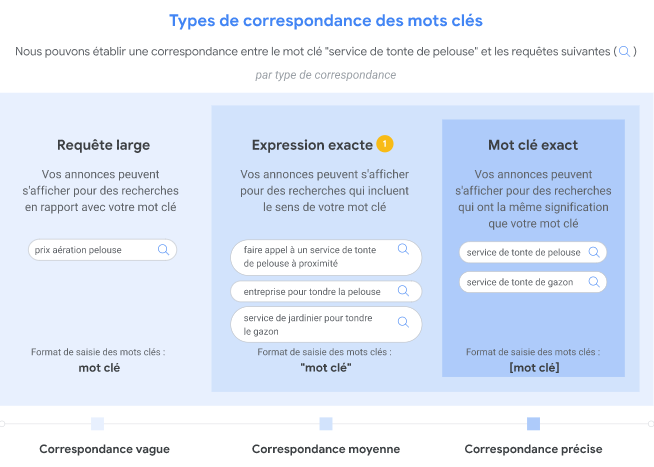
There are several match types that can be used to refine match types. These match types should be used to optimise ad campaigns in Google Ads.
1. Broad query
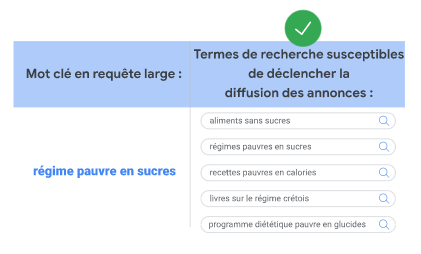
A keyword (or phrase) without any qualifiers will cause the advert to appear for a wide range of user queries. Furthermore, the meaning of the words used is irrelevant, and the advert may appear for searches that do not contain the keyword. The search engine will use not only synonyms, but also other keywords from the ad group, the content of the landing page, or any other element that helps the engine understand the meaning of the keyword.
2- «Exact expression»
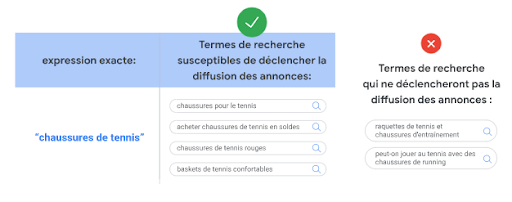
The search will match the meaning used in the keyword. The search engine will be able to use synonyms, whilst remaining consistent with the term used. We will be able to add elements before and after the keyword. The new update currently being rolled out in Google Ads will also allow elements to be incorporated into the query in relation to the keyword. For example, «white chocolate» will appear for «cheap white chocolate». There is no longer any need to use broad match modifiers (+chocolate +white), which required both elements to appear in the search query in order for the ad to be displayed. This update will come into effect in July.
Exact term: «white chocolate»
Broad query modifier: +chocolate +white
| Modifier | Exact term: «white chocolate» | Broad query modifier : +chocolate +white | |
| July 2021 | Before | After | Before |
| Cheap white chocolate | OK | OK | OK |
| Cheap white chocolate | No | OK | OK |
3- Exact keyword
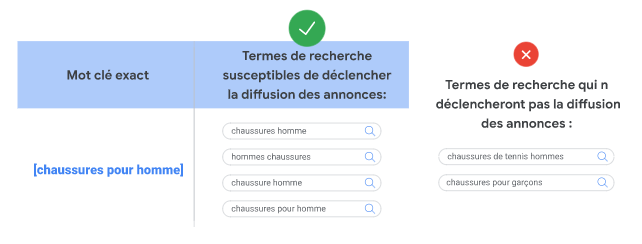
This is the most restrictive form of search: the user’s query must match the keyword exactly – apart from a few minor variations – for the result to appear. This is how you can ensure that a result appears for a precisely chosen phrase and nothing else. Of course, this limits the audience and the number of times the result is displayed, but it increases relevance.
4- Words to exclude
If you spot a keyword that you’re certain you don’t want to appear for, you should exclude it from the search results using the ‘-’ operator. There are several ways to exclude keywords: click here to find out more!
https://support.google.com/google-ads/answer/2453972
Source:
Google article on the subject:
https://support.google.com/google-ads/answer/10346549?visit_id=637534002385610814-553858917&rd=1
As part of their ongoing efforts to streamline procedures:
https://support.google.com/google-ads/answer/9426627
Created by VANISEO – Your web agency
Keywords, queries and search terms…
When we talk about search engine optimisation (SEO or SEA), there is often some confusion between the various terms used to refer to the searches and keywords used by a website or by a web user. In fact, these are rarely just single, isolated words, but more often groups of words or even parts of sentences. However, distinguishing clearly between them helps to better understand how to manage the tools and the information that comes back.
What a web user types into a search engine is called a query or search term: here, we distinguish between each variation of the search. Feminine, masculine, singular, plural, spelling mistakes or even accents – every difference is specific and results in a unique search term. Every variation is counted. This is exactly what the user is looking for.
On the other hand, we have keywords. These are often used on websites, both within the content itself and in meta tags. This provides the website or page in question with a semantic framework that enables it to be indexed by search engines. These keywords must be chosen carefully to ensure the page is relevant to users’ searches. They are also used in SEA (search engine advertising) to boost the ranking of adverts on the search results page (SERP). Their use is essential in search engine optimisation (SEO) for the visibility and relevance of websites, pages and content.
The role of a search engine is precisely to match users’ search queries with relevant results. The relevance of the results stems from the interpretation of the queries in relation to the keywords used on the website. Relevance is assessed and presented to the user when the search engine deems it to be sufficient.
Use of keywords
A key aspect of working with Google Ads is precisely to ensure that the search engine correctly interprets the chosen keywords in relation to the search terms used by internet users: you have to be relevant to be effective!
The first step is to identify the keywords that are important to the advertiser: which product or service do they want to highlight? What vocabulary do they use? Do the words have multiple meanings? Do they really match what internet users are searching for?… There are several tools available online to help determine the relevance of these keywords within the strategy being used. Examples include Google Trends, Ubersuggest and the Google Ads Keyword Planner.
But this must also be reflected in the search terms. Internet users do not necessarily use the same spelling or phrasing to refer to the same thing. They may use variations, synonyms or add extra words (such as ‘cheap’, etc.), so it is clear that tools must be used to allow for these variations whilst preventing others.
Keyword matching options
There are several match types that can be used to refine match types. These match types should be used to optimise ad campaigns in Google Ads.
1. Broad query
A keyword (or phrase) without any qualifiers will cause the advert to appear for a wide range of user queries. The meaning of the words used is irrelevant, and the advert may appear for searches that do not contain the keyword. The search engine will use not only synonyms, but also other keywords from the ad group, the content of the landing page, or any other element that helps the engine understand the meaning of the keyword.
2- «Exact expression»
The search will match the meaning used in the keyword. The search engine will be able to use synonyms, whilst remaining consistent with the term used. We will be able to add elements before and after the keyword. The new update currently being rolled out in Google Ads will also allow elements to be incorporated into the query in relation to the keyword. For example, «white chocolate» will appear for «cheap white chocolate». There is no longer any need to use broad match modifiers (+chocolate +white), which required both elements to appear in the search query in order for the ad to be displayed. This update will come into effect in July.
3- Exact keyword
This is the most restrictive form of search: the user’s query must match the keyword exactly – apart from a few minor variations – for the result to appear. This is how you can ensure that a result appears for a precisely chosen phrase and nothing else. Of course, this limits the audience and the number of times the result is displayed, but it increases relevance.
4- Words to exclude
If you spot a keyword that you’re certain you don’t want to appear for, you should exclude it from the search results using the ‘-’ operator. There are several ways to exclude keywords: click here to find out more!
https://support.google.com/google-ads/answer/2453972
Source:
Google article on the subject:
https://support.google.com/google-ads/answer/10346549?visit_id=637534002385610814-553858917&rd=1
As part of their ongoing efforts to streamline procedures:
https://support.google.com/google-ads/answer/9426627
Created by VANISEO – Your web agency
Contact us
Our team will get back to you within 24 hours
Fancy climbing back up the Google rankings?
Our SEO and GEO experts in Marseille will carry out an audit of your website and draw up a practical action plan.
 French
 Spanish
 English